

































KI-Beratung Beta

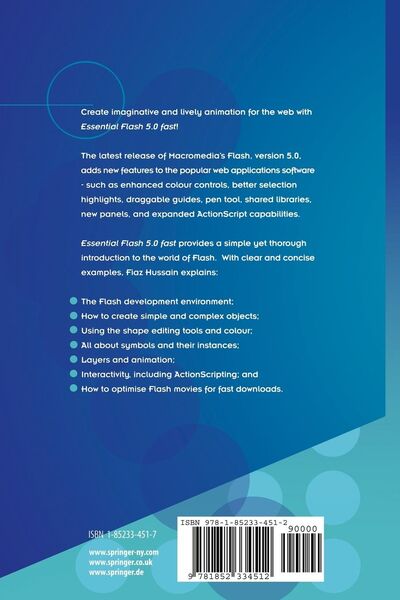
  • Produktbild: Essential Flash 5.0 fast
  • Produktbild: Essential Flash 5.0 fast

Essential Flash 5.0 fast Rapid Web Animation

Aus der Reihe Essential Series

42,99 €

inkl. gesetzl. MwSt., Versandkostenfrei


Beschreibung

1. Flash Environment.- The environment.- The Stage.- The Toolbars.- The Timeline.- The Panels.- 2. Flash Basics.- Bitmap and vector graphics.- Import and export of artwork.- Setting Preferences.- Speeding-up displays.- Grids, rulers and guides.- 3. Simple Flash Objects.- Tools on the Toolbox.- Drawing...

Beschreibung

1. Flash Environment.- The environment.- The Stage.- The Toolbars.- The Timeline.- The Panels.- 2. Flash Basics.- Bitmap and vector graphics.- Import and export of artwork.- Setting Preferences.- Speeding-up displays.- Grids, rulers and guides.- 3. Simple Flash Objects.- Tools on the Toolbox.- Drawing a straight line.- Drawing ovals and rectangles.- Drawing with the Pencil tool.- Drawing with the Brush tool.- Working with the Pen tool.- 4. Editing Flash Objects.- Selecting objects.- Using the Arrow tool.- Using the Lasso tool.- Using the Brush tool.- Using the Paint Bucket tool.- Using the Ink Bottle tool.- Using the Eraser tool.- Using the Dropper tool.- Aligning objects.- Transformation of objects.- 5. Adding Text.- Understanding Flash text.- Using the Text tool.- Working with text.- Editing text objects.- Editing text characters.- Working with text shapes.- 6. Working With Imported Bitmaps.- Understanding bitmaps.- Importing bitmaps.- Editing bitmap images.- Converting bitmaps to vector graphics.- Setting bitmap properties.- 7. Using The Library, Symbols AND INSTANCES.- The Library interface.- Working with Library folders.- Working with imported files.- Creating symbols.- Editing symbols.- Creating and editing instances.- Working with symbols and instances.- Working with shared symbols.- 8. Understanding Layers.- Creating layers.- Editing layers.- Viewing layers.- Types of layers.- 9. Adding Animation.- Working with the Timeline.- Viewing frames in the Timeline.- Frame types.- Working with frames.- Creating frame-by-frame animation.- Onion-skinning an animation.- Creating shape-tweened animation.- Creating motion-tweened animation.- 10. Interactivity and Scripting.- Working with editable text boxes.- Introducing buttons.- Adding action to buttons.- Adding action to frames.- Working with movies.- 11. Publishing and Exporting Movies.- Testing the movie for functionality and performance.- Understanding Publish Settings.- Previewing publish settings.- Exporting movies.- Printing movies.

Produktdetails

Einband

Taschenbuch

Erscheinungsdatum

07.08.2001

Abbildungen

XIII, 240 p.

Verlag Springer London

Produktdetails

Einband

Taschenbuch

Erscheinungsdatum

07.08.2001

Abbildungen

XIII, 240 p.

Verlag Springer London
Seitenzahl

240

Maße (L/B/H)

23,5/15,5/1,5 cm

Gewicht

394 g

Auflage

Softcover reprint of the original 1st edition 2001

Sprache

Englisch

ISBN

978-1-85233-451-2

Herstelleradresse

Springer-Verlag KG
Sachsenplatz 4-6
1201 Wien
AT

Email: ProductSafety@springernature.com

Ein neues Kapitel für Ihre Bücher

Ein neues Kapitel für Ihre Bücher

Schenken Sie Ihren alten Schätzen ein zweites Leben und erhalten Sie dafür eine Thalia Geschenkkarte.

Jetzt verkaufen
Jetzt verkaufen

Noch keine Bewertungen vorhanden

Verfassen Sie die erste Bewertung zu diesem Artikel

Helfen Sie anderen Kundinnen und Kunden durch Ihre Meinung.

Kundinnen und Kunden meinen

Bewertungen (0)

  • Produktbild: Essential Flash 5.0 fast
  • Produktbild: Essential Flash 5.0 fast
  • 1. Flash Environment.- The environment.- The Stage.- The Toolbars.- The Timeline.- The Panels.- 2. Flash Basics.- Bitmap and vector graphics.- Import and export of artwork.- Setting Preferences.- Speeding-up displays.- Grids, rulers and guides.- 3. Simple Flash Objects.- Tools on the Toolbox.- Drawing a straight line.- Drawing ovals and rectangles.- Drawing with the Pencil tool.- Drawing with the Brush tool.- Working with the Pen tool.- 4. Editing Flash Objects.- Selecting objects.- Using the Arrow tool.- Using the Lasso tool.- Using the Brush tool.- Using the Paint Bucket tool.- Using the Ink Bottle tool.- Using the Eraser tool.- Using the Dropper tool.- Aligning objects.- Transformation of objects.- 5. Adding Text.- Understanding Flash text.- Using the Text tool.- Working with text.- Editing text objects.- Editing text characters.- Working with text shapes.- 6. Working With Imported Bitmaps.- Understanding bitmaps.- Importing bitmaps.- Editing bitmap images.- Converting bitmaps to vector graphics.- Setting bitmap properties.- 7. Using The Library, Symbols AND INSTANCES.- The Library interface.- Working with Library folders.- Working with imported files.- Creating symbols.- Editing symbols.- Creating and editing instances.- Working with symbols and instances.- Working with shared symbols.- 8. Understanding Layers.- Creating layers.- Editing layers.- Viewing layers.- Types of layers.- 9. Adding Animation.- Working with the Timeline.- Viewing frames in the Timeline.- Frame types.- Working with frames.- Creating frame-by-frame animation.- Onion-skinning an animation.- Creating shape-tweened animation.- Creating motion-tweened animation.- 10. Interactivity and Scripting.- Working with editable text boxes.- Introducing buttons.- Adding action to buttons.- Adding action to frames.- Working with movies.- 11. Publishing and Exporting Movies.- Testing the movie for functionality and performance.- Understanding Publish Settings.- Previewing publish settings.- Exporting movies.- Printing movies.