














































KI-Beratung Beta

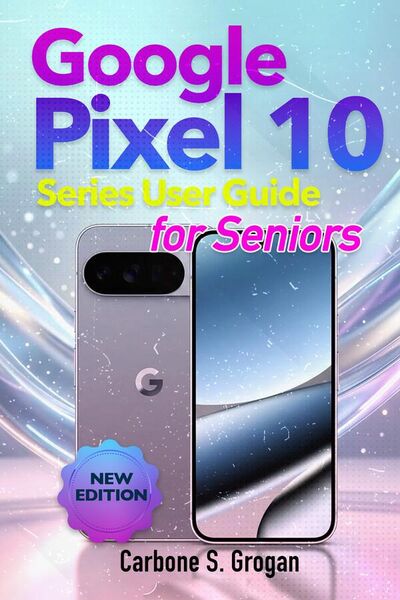
Produktbild: Google Pixel 10 Series User Guide for Seniors

Google Pixel 10 Series User Guide for Seniors Simple Step-by-Step Manual to Mastering the Pixel 10, 10 Pro, XL, and Fold with Android 16, Gemini AI, Camera Features, and Troubleshooting

11,49 €

inkl. gesetzl. MwSt.

Beschreibung

Disclaimer This book is an independent user guide created for educational and informational purposes only. It is not affiliated with, endorsed by, or sponsored by Google or any related brand. All product names, trademarks, and logos are the property of their respective owners. The author makes no guarantees...

Beschreibung

Disclaimer
This book is an independent user guide created for educational and informational purposes only. It is not affiliated with, endorsed by, or sponsored by Google or any related brand. All product names, trademarks, and logos are the property of their respective owners. The author makes no guarantees regarding results, and readers are responsible for how they apply the information provided.
You bought the Google Pixel 10 to stay connected, informed, and in control.
But once you start using it…
The screen feels unfamiliar.
The settings seem confusing.
And even simple tasks take longer than they should.
Making a call.
Sending a message.
Taking a photo.
Things that should feel easy suddenly feel frustrating.
And that hesitation?
It holds you back from using your phone the way you want.
This guide changes that-quickly.
The Google Pixel 10 Series User Guide for Seniors is designed to walk you through everything in clear, simple steps-without jargon, without rushing, and without assuming you already understand technology.
From the very first page, everything becomes easier.
You stop feeling unsure…
and start using your phone with confidence.
Inside this guide, you'll learn how to:
• Set up your Pixel 10 the right way from the start
• Make calls, send texts, and manage contacts easily
• Use the camera to take clear, beautiful photos
• Navigate your phone using simple gestures or buttons
• Use Gemini AI to ask questions, set reminders, and get help instantly
• Stay safe with privacy, security, and scam protection features
• Adjust settings for larger text, better sound, and easier use
• Fix common problems without needing outside help
This isn't about learning everything.
It's about learning what matters most-step by step.
So when you pick up your phone…
You know what to do.
No confusion.
No frustration.
No second-guessing.
Just clear, simple control.
Because once it clicks…
Your phone becomes easier, faster, and more useful every day.
Whether this is your first smartphone or you just want things to finally make sense-
this guide gives you what most people struggle to figure out:
confidence, clarity, and independence.
If you're ready to stop feeling stuck, start using your Pixel 10 with ease, and enjoy everything it can do.
Order now and take full control of your Google Pixel 10 today.

Produktdetails

Format

ePUB

Kopierschutz

Nein

Family Sharing

Ja

Text-to-Speech

Ja

Produktdetails

Format

ePUB

Format

eBooks im ePUB-Format erlauben eine dynamische Anpassung des Inhalts an die jeweilige Display-Größe des Lesegeräts. Das Format eignet sich daher besonders für das Lesen auf mobilen Geräten, wie z.B. Ihrem tolino, Tablets oder Smartphones.

Kopierschutz

Nein

Kopierschutz

Dieses eBook können Sie uneingeschränkt auf allen Geräten der tolino Familie, allen sonstigen eReadern und am PC lesen. Das eBook ist nicht kopiergeschützt und kann ein personalisiertes Wasserzeichen enthalten. Weitere Hinweise zum Lesen von eBooks mit einem personalisierten Wasserzeichen finden Sie unter Hilfe/Downloads.

Family Sharing

Ja

Family Sharing

Mit Family Sharing können Sie eBooks innerhalb Ihrer Familie (max. sechs Mitglieder im gleichen Haushalt) teilen. Sie entscheiden selbst, welches Buch Sie mit welchem Familienmitglied teilen möchten. Auch das parallele Lesen durch verschiedene Familienmitglieder ist durch Family Sharing möglich. Um eBooks zu teilen oder geteilt zu bekommen, muss jedes Familienmitglied ein Konto bei Thalia oder einem anderen tolino-Buchhändler haben. Weitere Informationen finden Sie unter Hilfe/Family-Sharing.

Text-to-Speech

Ja

Text-to-Speech

Bedeutet Ihnen Stimme mehr als Text? Mit der Funktion Text-to-Speech können Sie sich im tolino webReader und in der aktuellen Thalia – Lesen & Hören App das eBook vorlesen lassen. Weitere Informationen finden Sie unter Hilfe/Text-to-Speech.

Erscheinungsdatum

14.04.2026

Verlag Carbone S. Grogan
Seitenzahl

(Printausgabe)

Dateigröße

1426 KB

Sprache

Englisch

EAN

9791224455134

Barrierefreiheit
  • alle Texte können angepasst werden
  • nicht oder eingeschränkt barrierefrei

Noch keine Bewertungen vorhanden

Verfassen Sie die erste Bewertung zu diesem Artikel

Helfen Sie anderen Kundinnen und Kunden durch Ihre Meinung.

Kundinnen und Kunden meinen

Bewertungen (0)

Die Leseprobe wird geladen.
  • Produktbild: Google Pixel 10 Series User Guide for Seniors